

Cango logo
Smartphone scanning a passport-style ID card and utility bill on a dark desk under a warm orange lamp

Cango Verification: KYC without delays explained

Updated: 10 November 2026

Passing the Cango verification check is a mandatory step before any cashout leaves your balance. Casinos call this process KYC, which stands for Know Your Customer, a standard identity check that confirms you are over 18, live at your stated address, and own the payment methods used in the cashier. At Cango, this check runs through an automated system called Sumsub and takes up to 48 hours on business days. You cannot withdraw even the minimum A$30 until your profile is approved, so completing this stop right after your first deposit saves waiting time later.

Cango verification: documents in one table

Before opening the upload window in your account settings, gather your paperwork so you can finish the submission in a single session. The automated Sumsub portal asks for three standard items right away, while a fourth check regarding your payment method or income happens on request, usually when you ask for a larger cashout. Every file must show your full details clearly, matching the exact name and residential address you typed into the registration form when you created your AUD profile. If a middle name is on your passport, having it ready helps avoid mismatches during the automated scan.

DocumentRequirementsTiming
Photo ID documentValid passport, national ID card, or another government photo ID showing full name, birth date, and expiry date, with all four corners visibleUsually 24 to 48 hours
Proof of addressUtility bill, bank statement, or government letter issued within the last 90 days showing your full name and residential street addressUsually 24 to 48 hours
Selfie with documentClear live photo of your face holding the chosen photo ID next to your cheek, taken in bright lighting without glasses or hatsUsually 24 to 48 hours
Source of fundsBank statement, payslip, or screenshot of your Visa, Mastercard, or crypto wallet showing ownership, requested for large withdrawalsUp to 48 hours except weekends

Once these files pass the review, your profile status changes to verified and the withdrawal tab in the cashier opens up for Visa OCT (Original Credit Transfer, a direct refund route back to your Visa debit or credit card), Mastercard Payment Transfer, or your personal crypto wallet.

Cango KYC: how long checks take

The standard Cango KYC review takes up to 48 hours from the moment you submit your final photo, though in practice most clean uploads are cleared within 24 to 48 hours. One honest limitation to keep in mind is that the verification team does not process files on weekends. If you upload your passport and power bill on a Friday evening after hitting a win on the pokies, the 48-hour clock effectively pauses over Saturday and Sunday, meaning your approval will likely land on Monday or Tuesday.

Wait times also stretch out if you wait until you have a cashout waiting in the queue. Every withdrawal goes through a pending window (the initial stage up to 24 hours where the payout request sits in your account and can still be cancelled) followed by processing (the internal review stage up to 24 hours, 7 days a week, where the finance team approves and sends the funds). If your identity check is not done yet, your cashout stays stuck at the start.

Illustration: Suppose you deposit A$45 on Tuesday morning, play through your x1 deposit turnover on pokies, and request a A$250 cashout at 2:00 pm without prior verification; if KYC takes 36 hours and cashout processing takes 12 hours, your approval takes 36 + 12 = 48 hours in total, moving the payout to Thursday at 2:00 pm. Sending your files immediately after registering cuts that 36-hour wait out of your future withdrawal timeline. You can also ask the 24/7 live chat, which replies in about 2 minutes, to check if your uploaded images are readable.
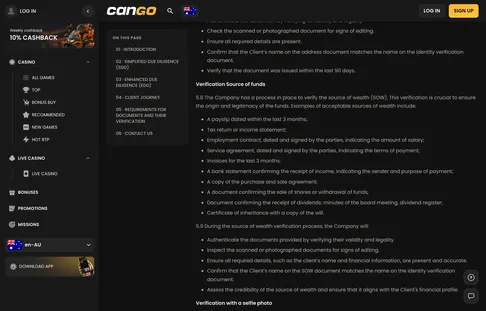
The Sumsub window asks for a photo ID, proof of address and a selfie holding the document.

Kyc 060 cango 1568x1003

Cango verification: the upload route

To start the check, log into your account, open your profile menu, and select the verification tab. This launches the Sumsub interface, a guided screen that walks you through three steps in exact order: identity document first, address proof second, and a live selfie last. Completing the steps on a smartphone is much easier than using a desktop computer because your phone camera focuses better on fine print and handles the selfie step directly. If you install the Cango app, which works as a PWA (Progressive Web App, a lightweight shortcut added directly from your mobile browser to your home screen without visiting an app store), the camera permissions connect right inside the window. Make sure you turn off any VPN before opening the portal, as Cango bans VPN connections and a masked IP address can trigger a manual review or a repeat check when you request a large withdrawal.

Identity

First, choose your country and document type in the Sumsub menu. Lay your passport or national photo ID card flat on a dark, plain table under natural light. Overhead lamps often create a white glare spot right over the plastic laminate covering your face or date of birth, which causes the automated reader to reject the photo. Make sure all four corners of the document sit inside the camera frame and none of the text at the bottom is cut off by your fingers.

Address

Next, upload your proof of address dated within the last 90 days. A PDF downloaded directly from your Australian bank or electricity provider works best because every letter is sharp, though a clean colour photo of a paper statement is also accepted. Check that the document displays the issue date, your full name, and the exact street address registered on your casino profile; mobile phone bills and envelopes are typically turned down.

Selfie

Finally, hold your photo ID up beside your face so both your eyes and the document details are clear in a single frame. Focus the camera on the small text of the ID card while keeping your chin straight and removing any sunglasses or caps. If the writing on the card looks blurry when you zoom in, retake the shot before hitting submit.

Stop summary:

  • Upload three core items via Sumsub: a valid photo ID, a proof of address under 90 days old, and a selfie holding your ID.
  • Verification takes up to 48 hours excluding weekends, and typically completes within 24 to 48 hours on business days.
  • No withdrawals are processed before KYC approval, and a source of funds check can be requested on large cashouts.

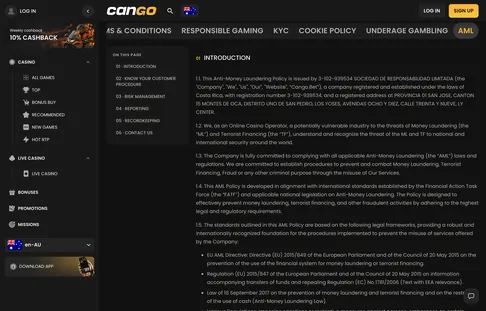
The AML policy explains when a source of funds check may be added to the standard KYC.

Aml 003 cango 1568x1003

Cango KYC: before you ask support

  • Which documents does Cango verification ask for?

    Sumsub asks for a photo ID (passport, national ID card or another photo ID), a proof of address dated within the last 90 days and a selfie holding the same document. Source of funds is requested only in some cases, usually with large withdrawals.

  • How long does Cango KYC take?

    The check takes up to 48 hours, except weekends, and in practice usually 24 to 48 hours. Clear photos with all four corners visible and an address that matches your profile are the fastest way through.

  • Can I withdraw before my Cango account is verified?

    No, withdrawals are not processed until verification is complete. That is why we suggest finishing KYC right after sign-up, before your first win, so the A$30 minimum cashout is not held up.

  • Why was my Cango verification document rejected?

    The usual reasons are a blurry or cropped photo, an expired document, a proof of address older than 90 days or a name that does not match the account. Upload a fresh, well-lit photo and ask live chat if the reason is unclear.

  • Can I upload my Cango KYC documents from a phone?

    Yes, the Sumsub window works in the mobile browser and in the home-screen PWA, and the phone camera is often the easiest way to take the selfie. Use good light and avoid glare on the document.